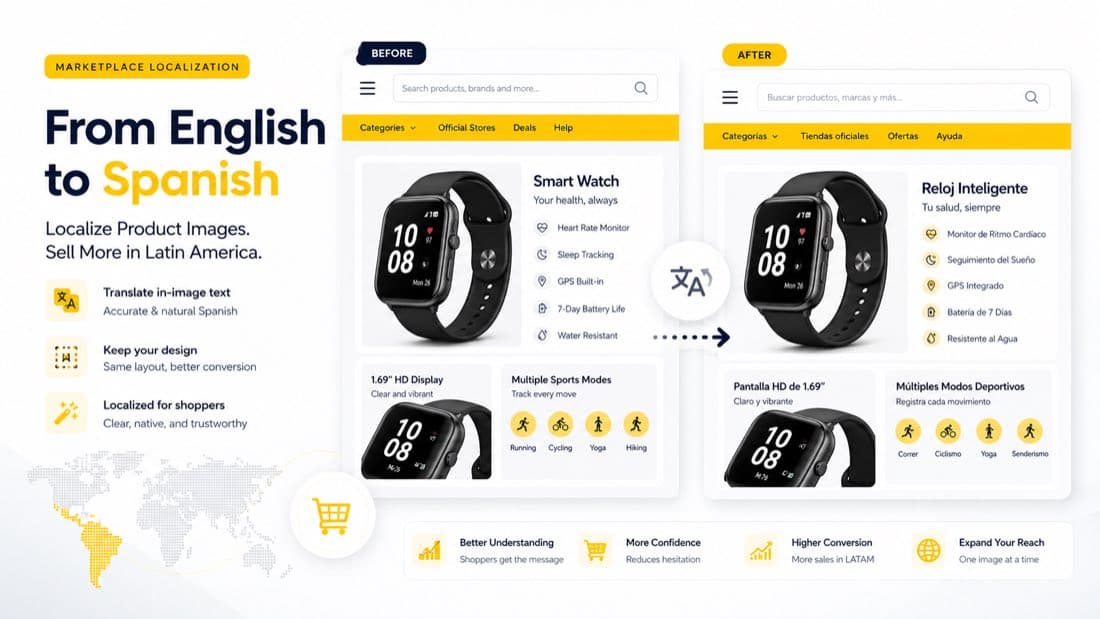
Mercado Libre Image Translator for Cross-Border Sellers
If you are expanding into Mercado Libre, translating your product title and description is only the beginning.
For many categories, the real selling message is inside the images:
- feature callouts
- benefit graphics
- comparison panels
- size charts
- dimensions and measurements
- instructions and usage visuals
- promotion badges and bundle graphics
If those visuals remain in English, your listing feels only partially localized. A shopper may understand the category and the product name, but still hesitate when the key details inside the images do not match their language.
That is why a Mercado Libre image translator matters for cross-border sellers. The goal is not just to convert words. The goal is to turn your existing product visuals into market-ready selling assets for Spanish-speaking buyers without redesigning every image from scratch.
Why image localization matters on Mercado Libre
Mercado Libre is not just another marketplace listing channel. In many categories, buyers scroll quickly, compare options aggressively, and rely on visuals to understand value fast.
That means product images need to answer questions such as:
- What does this product do?
- Why is it better than alternatives?
- What size or dimensions does it have?
- How do I use it?
- Is it right for my needs?
If the buyer sees Spanish in the listing text but English inside the infographics, the experience becomes fragmented. Even when the product is relevant, the listing can feel less trustworthy than a competitor that looks fully localized.
For cross-border sellers entering Mexico and broader Spanish-speaking Latin American markets, this is one of the most overlooked conversion gaps.
What a Mercado Libre image translator should actually do
A useful image translation workflow is more than OCR and basic text replacement.
For marketplace visuals, it should help you:
- detect text accurately inside product graphics
- translate e-commerce phrasing naturally into Spanish
- remove the original English text cleanly
- reconstruct the background behind the removed text
- preserve the original layout and hierarchy
- keep the final image readable on mobile
The output should not look like an edited file. It should look like the image was designed for the market from the start.
Which Mercado Libre images should you localize first
If you already have an English image set from Amazon, Shopify, or another storefront, you do not need to localize everything at once. Start with the visuals that directly affect buying confidence.
1. Feature and benefit graphics
These are often the most important images after the main product photo.
Localize the graphics that explain:
- what makes the product different
- what problem it solves
- what benefits the customer gets
- why they should choose it over alternatives
2. Size charts and measurement graphics
If you sell apparel, accessories, home items, storage products, furniture, or anything dimension-sensitive, image-based sizing information needs to be localized early.
Shoppers should not have to decode:
- measurement labels
- fit descriptions
- unit guidance
- body references
3. Usage and instruction visuals
For beauty, tools, kitchen items, electronics accessories, baby products, and home products, usage clarity has a direct impact on conversion.
Translate:
- how-to-use panels
- installation steps
- care instructions
- routine or dosage visuals
4. Comparison charts
If your listing uses "ours vs others," bundle comparisons, or model comparisons, these visuals should be localized before lower-priority lifestyle graphics.
5. Promotion and campaign creatives
If you use the same asset set across Mercado Libre and paid acquisition campaigns, localized promotional images help maintain consistency across the buying journey.
Common mistakes when translating product images for Mercado Libre
Many sellers treat this like a simple language task. In practice, it is a conversion task.
Mistake 1: Translating literally instead of writing shopper-friendly Spanish
Product graphics need short, clear, persuasive phrasing. Literal translations often sound stiff or unnatural in a marketplace context.
Mistake 2: Breaking the original layout
Spanish text frequently takes more space than English. If the translation is inserted without spacing or line-break adjustments, the image becomes harder to scan.
Mistake 3: Leaving obvious editing artifacts
If the original text is removed poorly, the image looks patched, blurred, or boxed out. That instantly lowers perceived quality.
Mistake 4: Using inconsistent terms across images
If one image says one thing and the next image uses a different phrase for the same feature, the listing feels less polished.
Build consistency for:
- feature names
- size labels
- material terms
- usage instructions
- comparison language
Mistake 5: Localizing every image equally
Some visuals matter much more than others. Start with the product images that reduce hesitation and explain value first.
How to localize Mercado Libre product images efficiently
The most efficient workflow is usually to adapt your existing English assets rather than redesigning them manually.
Step 1: Select the 3 to 5 highest-impact visuals
For most sellers, that means:
- one top feature infographic
- one comparison or trust-building graphic
- one usage or instruction panel
- one size chart or dimension image
- one additional image that answers a frequent buyer question
Step 2: Translate the in-image text into Spanish
With VOKWA AI, the workflow can be much faster:
- upload the original product image
- choose Spanish as the target language
- detect the text inside the image
- translate and replace the text in the existing design
- review the output
- export the localized version for Mercado Libre
This is especially useful when you are working across multiple SKUs and cannot afford to rebuild every file manually.
Step 3: Review the final result like a Mercado Libre shopper
Before publishing, check for:
- mobile readability
- natural Spanish phrasing
- clean spacing and line breaks
- consistent terminology across the listing
- clean background reconstruction
The best localized image should feel native, not edited.
Why Mercado Libre sellers should not rely on text-only localization
Many marketplace teams focus on titles, bullet points, and backend listing fields first. That is important, but it misses how buyers actually evaluate products.
In practice:
- listing copy supports discovery
- product images support understanding
- trust comes from the combination of both
If the listing text is localized but the images are not, the buyer still experiences friction at the moment of decision.
That is why image localization can become a faster win than rewriting more text. You are improving the visual layer that actually carries the sales argument.
Best use cases for Mercado Libre image translation
This workflow is especially useful for:
Sellers expanding from Amazon or Shopify into Latin America
If you already have high-performing English visuals, adapting them for Mercado Libre is usually faster than rebuilding them from zero.
Brands selling visually explained products
Categories such as beauty, apparel, home organization, supplements, gadgets, and kitchen tools often depend heavily on in-image text.
Teams managing many SKUs
A repeatable image localization workflow reduces manual design overhead when you need to scale across product catalogs.
Agencies and marketplace service providers
If you localize assets for multiple clients, image translation becomes much more efficient when it follows a consistent process instead of starting over every time.
Why VOKWA AI fits Mercado Libre localization workflows
VOKWA AI is designed for product-image localization workflows where sellers need to adapt existing visuals for new markets quickly.
For Mercado Libre sellers, the main requirements are usually:
- clean text replacement
- preserved layout quality
- faster localization across many images
- less manual design work
That is the real value: turning your current English creative into Spanish-ready marketplace assets without rebuilding the entire visual system.
Final thoughts
If your Mercado Libre listing title is in Spanish but your images are still in English, your localization is not complete yet.
Start with the visuals that matter most:
- feature and benefit infographics
- size charts
- dimension graphics
- usage panels
- comparison charts
That gives you a faster path to a listing that feels clear, local, and more conversion-ready for Spanish-speaking shoppers.
If you want to adapt product images for Mercado Libre without redesigning everything manually, VOKWA AI can help you localize the visuals you already have.
FAQ
Should I localize Mercado Libre product images if my listing title is already in Spanish?
Yes. The title helps with discovery, but the images often carry the actual selling message. If they stay in English, the listing still feels only partially localized.
Which images should I translate first for Mercado Libre?
Start with feature graphics, size charts, dimensions, instruction panels, and comparison charts.
Is it better to redesign all images manually?
Usually not. If your English assets are already working, it is often faster and more scalable to localize the in-image text while preserving the original design.
Why is image localization more than translation?
Because the final image must still look clean, readable, and trustworthy. That requires layout preservation, background reconstruction, and natural shopper-facing phrasing.